> For the complete documentation index, see [llms.txt](https://firmachain-1.gitbook.io/firmachain/llms.txt). Markdown versions of documentation pages are available by appending `.md` to page URLs; this page is available as [Markdown](https://firmachain-1.gitbook.io/firmachain/module-comming-soon/contract/bulk-insert.md).

# Bulk Insert

계약 진행 시 addContractLog와 createContractFile을 하나의 트랜잭션에 2개 이상을 담아 보내거나, 여러 계약서를 한번에 대용량으로 보낼 때 사용합니다.

## Contents

<table><thead><tr><th width="346">Name</th><th>Description</th></tr></thead><tbody><tr><td><a href="#1.-getunsignedtxaddcontractlog">1. getUnsignedTxAddContractLog</a></td><td>addContractLog 트랜잭션 생성 메세지를 얻을 수 있습니다.</td></tr><tr><td><a href="#2.-getunsignedtxcreatecontractfile">2. getUnsignedTxCreateContractFile</a></td><td>addContractFile 트랜잭션 생성 메세지를 얻을 수 있습니다.</td></tr><tr><td><a href="#3.-getgasestimationsignandbroadcast">3. getGasEstimationSignAndBroadcast</a></td><td>트랜잭션 메시지 배열의 예상 가스 비용을 얻을 수 있습니다.</td></tr><tr><td><a href="#4.-signandbroadcast">4. signAndBroadcast</a></td><td>여러 개의 트랜잭션을 한번에 실행할 수 있습니다.</td></tr><tr><td><a href="#undefined">5. Params</a></td><td>API 호출을 위한 파라미터들의 정보입니다.</td></tr></tbody></table>

## 1. getUnsignedTxAddContractLog

계약 진행에서 발생한 이벤트를 기록할 수 있는 addContractLog 트랜잭션을 메시지 형태로 생성합니다. 메세지는 가스 계산 후 메세지를 실행할 수 있는 함수를 통해 트랜잭션을 생성하게 됩니다.\
*\* 가스 계산과 메시지 실행 방법은 3, 4번 함수를 확인해주세요.*

#### Parameters

<table><thead><tr><th width="160.33333333333331">Name</th><th width="244">Type</th><th>Example</th></tr></thead><tbody><tr><td>wallet</td><td><mark style="color:blue;">Object</mark> (<mark style="color:green;">FirmaWalletService</mark>)</td><td><em>You can check the usage through the "</em><a href="https://firmachain-1.gitbook.io/firmachain/module-comming-soon/contract/log#undefined"><em>Github example source</em></a><em>".</em></td></tr><tr><td>contractHash</td><td><mark style="color:blue;">String</mark></td><td>"da39330a6dfd90a91563603950f742240fa222580beecf36e141fe6410184e8b1669119707"</td></tr><tr><td>timeStamp</td><td><mark style="color:blue;">Number</mark></td><td>1669182016039</td></tr><tr><td>eventName</td><td><mark style="color:blue;">String</mark></td><td>"createContract"</td></tr><tr><td>ownerAddress</td><td><mark style="color:blue;">String</mark></td><td>"firma1nssuz67am2uwc2hjgvphg0fmj3k9l6cx65ux9u"</td></tr><tr><td>jsonString</td><td><mark style="color:blue;">String</mark> (<mark style="color:green;">JSON</mark>)</td><td>"{Encryption:{type:"JWT",alg:"HS256"},contracts:[{target:"contractor1",email:"contractor1@gmail.com"}]}"</td></tr></tbody></table>

#### Return value

```json5
{
  typeUrl: '/firmachain.firmachain.contract.MsgAddContractLog',
  value: {
    creator: 'firma1nssuz67am2uwc2hjgvphg0fmj3k9l6cx65ux9u',
    contractHash: 'da39330a6dfd90a91563603950f742240fa222580beecf36e141fe6410184e8b',
    timeStamp: 1669199517,
    eventName: 'createContract',
    ownerAddress: 'firma1nssuz67am2uwc2hjgvphg0fmj3k9l6cx65ux9u',
    jsonString: '"{}"'
  }
}
```

## 2. getUnsignedTxCreateContractFile

계약서를 체인에 기록하는createContractLog 트랜잭션을 메시지 형태로 생성합니다.\
메세지는 가스 계산 후 메세지를 실행할 수 있는 함수를 통해 트랜잭션을 생성하게 됩니다.\
*\* 가스 계산과 메시지 실행 방법은 3, 4번 함수를 확인해주세요.*

**Parameters**

<table><thead><tr><th width="209.33333333333331">Name</th><th width="244">Type</th><th>Example</th></tr></thead><tbody><tr><td>wallet</td><td><mark style="color:blue;">Object</mark> (<mark style="color:green;">FirmaWalletService</mark>)</td><td><em>You can check the usage through the "</em><a href="https://firmachain-1.gitbook.io/firmachain/module-comming-soon/contract/log#undefined"><em>Github example source</em></a><em>".</em></td></tr><tr><td>fileHash</td><td><mark style="color:blue;">String</mark></td><td>"da39330a6dfd90a91563603950f742240fa222580beecf36e141fe6410184e8b1669119707"</td></tr><tr><td>timeStamp</td><td><mark style="color:blue;">Number</mark></td><td>1669182016039</td></tr><tr><td>ownerList</td><td><mark style="color:blue;">Array</mark> (<mark style="color:blue;">String</mark>)</td><td>["firma1epg9kx7nqz32dykj23p6jreqfh5x0wdy5a43qc"]</td></tr><tr><td>metaDataJsonString</td><td><mark style="color:blue;">String</mark> (<mark style="color:green;">JSON</mark>)</td><td>'{"storage":"ipfs","encryptIpfsHash":["U2FsdGVkX19UsL3m7Cq2bOtTCQArqZTuLgz7mfdRtXM2MnIgm67GM26GtPELsVL8s4+IN2Vj9FbFzpFj3rwfaw=="]}'</td></tr><tr><td>txMisc (Not required)</td><td><mark style="color:blue;">Object</mark> (<mark style="color:green;">TxMisc</mark>)</td><td>{fee:200000,gas:163821,memo:"custom message"}</td></tr></tbody></table>

#### Return value

```json5
{
  typeUrl: '/firmachain.firmachain.contract.MsgCreateContractFile',
  value: {
    creator: 'firma1nssuz67am2uwc2hjgvphg0fmj3k9l6cx65ux9u',
    fileHash: 'da39330a6dfd90a91563603950f742240fa222580beecf36e141fe6410184e8b1669199724',
    timeStamp: 1669199724,
    ownerList: [
      'firma1nssuz67am2uwc2hjgvphg0fmj3k9l6cx65ux9u',
      'firma1nssuz67am2uwc2hjgvphg0fmj3k9l6cx65ux9u'
    ],
    metaDataJsonString: '"{}"'
  }
}
```

## 3. getGasEstimationSignAndBroadcast

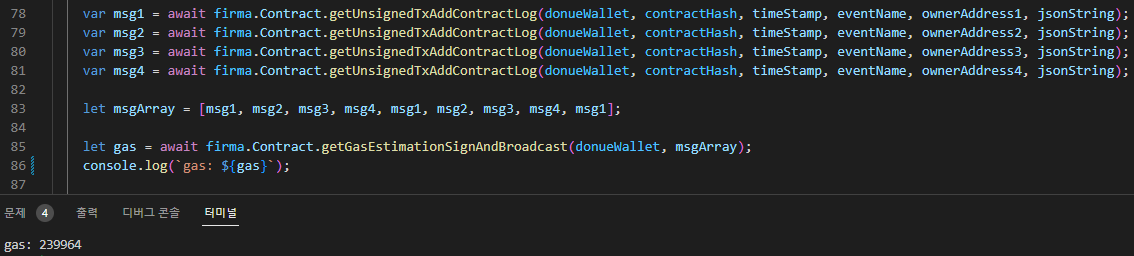
1, 2번 함수를 통해 생성한 메세지를 배열을 트랜잭션 생성할 때 사용될 가스 예상 비용을 얻을 수 있습니다. 이 함수가 필요한 이유는 Bulk Insert 사용 시 default 가스 비용(0.02fct)을 초과할 가능성이 높습니다. 그렇기에 예상 가스 비용을 구해야 합니다.

#### Parameters

<table><thead><tr><th width="172.33333333333331">Name</th><th width="256">Type</th><th>Example</th></tr></thead><tbody><tr><td>wallet</td><td><mark style="color:blue;">Object</mark> (<mark style="color:green;">FirmaWalletService</mark>)</td><td><em>You can check the usage through the "</em><a href="https://firmachain-1.gitbook.io/firmachain/module-comming-soon/contract/log#undefined"><em>Github example source</em></a><em>".</em></td></tr><tr><td>msgList</td><td><mark style="color:blue;">msgList</mark> (<mark style="color:green;">EncodeObject[]</mark>)</td><td><strong>1</strong> or <strong>2</strong> "Return value" Array value.</td></tr></tbody></table>

#### Return value

```json5
239964
```

#### Example Run Image

<figure><img src="/files/CIP0z2oAOtzA5Q9gjofM" alt=""><figcaption></figcaption></figure>

## 4. signAndBroadcast

1, 2번 함수를 통해 생성한 메세지를 배열 형태로 만든 후 트랜잭션 생성할 수 있습니다.

#### Parameters

<table><thead><tr><th width="209.33333333333331">Name</th><th width="248">Type</th><th>Example</th></tr></thead><tbody><tr><td>wallet</td><td><mark style="color:blue;">Object</mark> (<mark style="color:green;">FirmaWalletService</mark>)</td><td><em>You can check the usage through the "</em><a href="https://firmachain-1.gitbook.io/firmachain/module-comming-soon/contract/log#undefined"><em>Github example source</em></a><em>".</em></td></tr><tr><td>msgList</td><td><mark style="color:blue;">msgList</mark> (<mark style="color:green;">EncodeObject[]</mark>)</td><td><strong>1</strong> or <strong>2</strong> "Return value" Array value.</td></tr><tr><td>txMisc (Not required)</td><td><mark style="color:blue;">Object</mark> (<mark style="color:green;">TxMisc</mark>)</td><td>{fee:200000,gas:163821,memo:"custom message"}</td></tr></tbody></table>

#### Return value

```json5
{
  code: 0,
  height: 428306,
  rawLog: '[
  {
    "events": [{
      "type":"message",
      "attributes":[{"key":"action","value":"CreateContractFile"}]
    }]
  }, {
    "msg_index":1,
    "events":[{
      "type":"message",
      "attributes": [{"key":"action","value":"CreateContractFile"}]
    }]
  }, {
    "msg_index":2,
    "events":[{
      "type":"message",
      "attributes": [{"key":"action","value":"CreateContractFile"}]
    }]
  }]',
  transactionHash: 'DC03E4872A97325D3AAA58B9B6296476E32AD42D8A448F6C7460F9D260CCBB56',
  gasUsed: 98872,
  gasWanted: 113703
}
```

#### Image of the transaction verified in Blockchain Explorer

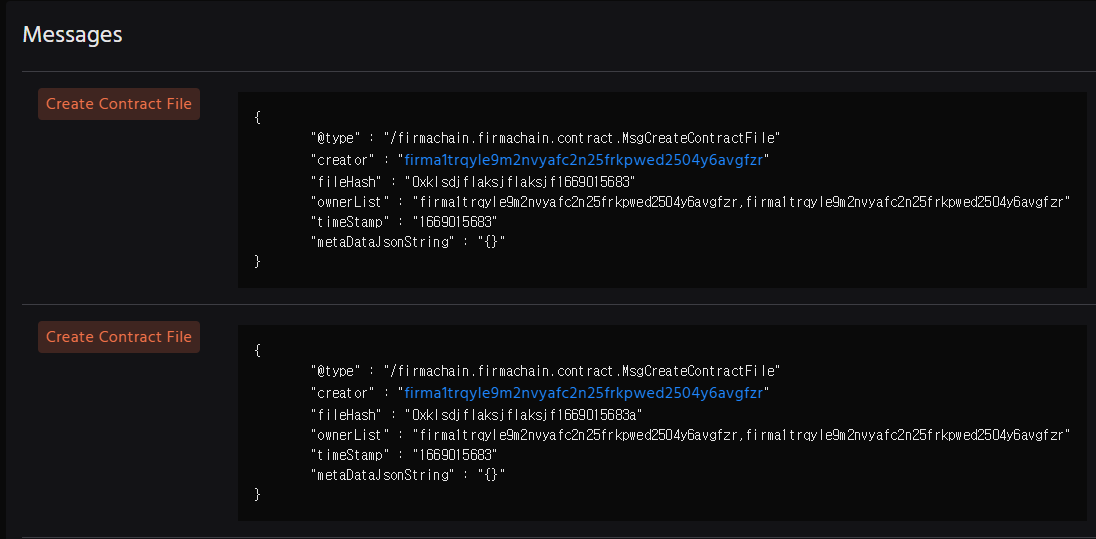
<figure><img src="/files/WaBOys48n4BPHtlrFCe5" alt=""><figcaption></figcaption></figure>

## 5. Params

<table><thead><tr><th width="238">Name</th><th>Description</th></tr></thead><tbody><tr><td>wallet</td><td>사용자의 Mnemonic으로 생성한 고유 지갑 변수입니다. FirmaSDK 모듈 중 Wallet.fromMnemonic 함수를 통해 선언할 수 있습니다.</td></tr><tr><td><p>contractHash &#x26;</p><p>fileHash</p></td><td>파일 또는 텍스트 정보를 고정된 길이로 매핑한 정보입니다. 체인에서 Contract 추적을 위한 정보로 활용이 가능하며, 하나의 Contract Hash에 여러 개의 Log를 추가할 수 있습니다. 고유 값 사용을 권장하며, FirmaUtil을 통해 파일 및 텍스트의 해시 값을 가져올 수 있습니다.</td></tr><tr><td>timeStamp</td><td>해당 이벤트 또는 행동, 결과에 대한 로그가 발생한 시점을 의미합니다. "Unix time stamp" 형식이며, 숫자 타입으로 작성해주세요.</td></tr><tr><td>eventName</td><td>이벤트 또는 행동, 결과에 대한 정보를 의미합니다. 계약 진행을 예로 들어 "계약 생성", "서명자 초대", "계약자1 서명", "모든 서명 완료", "계약 완료" 로 사용될 수 있습니다.</td></tr><tr><td>ownerAddress</td><td>피르마체인 지갑 주소를 입력해주세요. 지갑 주소의 대상은 누구나 될 수 있으며, "서비스 대표 지갑 주소", "서명자 지갑 주소" 등을 예시로 들 수 있습니다.</td></tr><tr><td>ownerList</td><td>계약과 연관있는 사용자의 지갑 주소 배열입니다. ownerAddress와 동일한 목적으로 추가할 수 있습니다.</td></tr><tr><td>jsonString &#x26;<br>metaDataJsonString</td><td><p>계약과 관련된 추가 정보를 기록할 수 있습니다. 예를 들어 공개키(암호화), 계약서 저장 공간 또는 다운로드 링크, 계약 진행자의 이메일 주소 등이 될 수 있습니다. JSON 형식의 문자열 타입으로 작성해주세요.</p><p><em>* 정해진 규격은 없으며 커스텀 하여 사용하시면 됩니다.</em></p></td></tr><tr><td>txMisc</td><td>트랜잭션 호출 시 사용될 수수료 비용을 담고 있는 오브젝트입니다.<br><em>* 가스 계산 없이 사용할 경우 기본 가스 비용은 0.02fct입니다.</em></td></tr><tr><td>msgList</td><td>트랜잭션을 실행할 수 있는 메세지를 담고 있는 배열입니다.<br>* 배열은 서로 다른 트랜잭션 메시지를 담을 수 있습니다.</td></tr></tbody></table>